What you can do with a job
The six actions on every job page: apply, save, and four tools that get you ready.
The six actions
- Apply — takes you to the job on its source. You always apply there; we never send your CV to an employer without asking you.
- Save to My applications — keeps the job so you can follow it.
- Tailor my CV — saves the job as your CV’s target and opens it in the editor, where you review every suggested change before it is applied.
- Write a cover letter — starts a letter with the job’s title, company and description filled in.
- Check my CV against this job — an ATS check that compares your CV with the job and shows what to improve.
- Practise the interview — questions built from the job and your CV, with feedback on each answer.
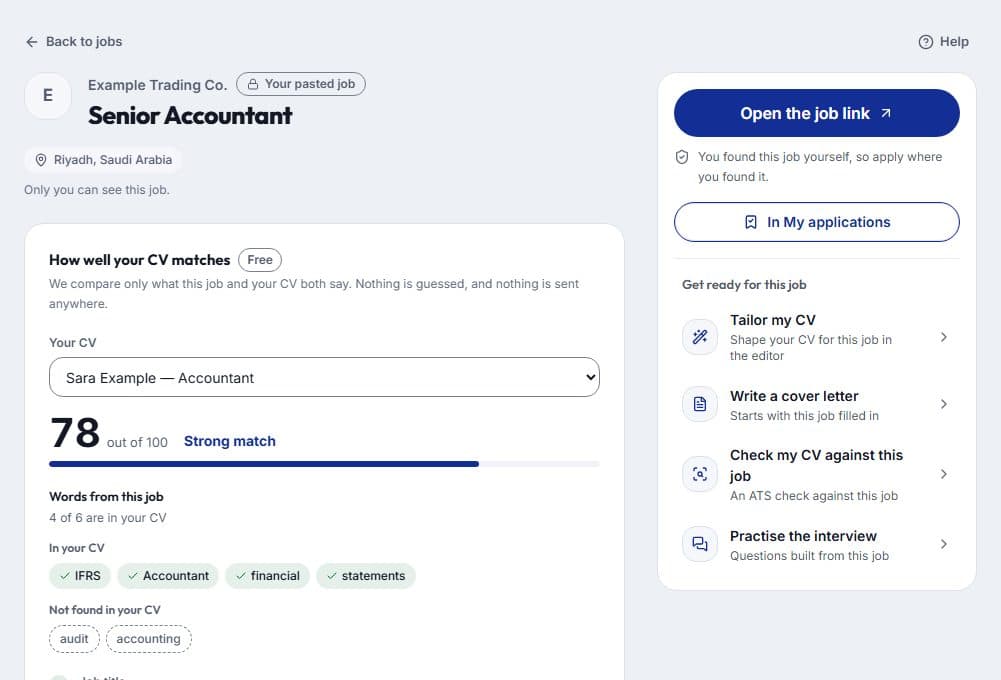
How well your CV matches
Each job page shows how well your newest CV matches the job; pick another of your CVs to compare it instead. It is free and uses no AI. It compares only what the job and your CV both say: the job’s words found or not found in your CV, the job title, the level and the place. A part either side does not state is left out of the score.
When the source shows only a short summary of the job, the result is marked Partial. Add a missing word to your CV only where it is true for you — Tailor my CV and the ATS check are one click away.
Points and your facts
The four tools use points when you run them; opening them is free, and each one tells you what it needs before anything is charged.
The tools work only with what your CV already says. They never add an employer, a date, a number or a skill you did not give.