Install the app on your phone or computer
Add Tabhar to your Home Screen on iPhone, or install it from your account menu on Android and on a computer.
On iPhone (Safari)
- Open Tabhar in Safari and sign in.
- Tap the Share button (the square with an arrow) at the bottom of the screen.
- Scroll down and tap “Add to Home Screen”.
- Tap “Add”. The Tabhar icon appears on your Home Screen and opens like an app.
Other browsers on iPhone may not offer this — use Safari.
On Android and on a computer (Chrome or Edge)
- Sign in to Tabhar.
- Open the menu on the side of the page (on a phone, tap the menu button at the top first).
- Tap “Install the app”, then “Install” in the window your browser opens.
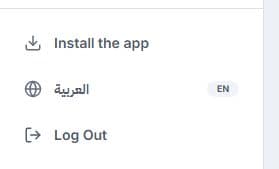
If you do not see “Install the app”, the app is already installed or your browser cannot install it. You can keep using Tabhar in your browser as usual.
What the app is
It is the same Tabhar you use in your browser, in its own window, with shortcuts to your dashboard, Find jobs and My applications. It does not work offline yet, and it sends no phone notifications yet.